


Icon Drums Classic Rock
Get the Beloved Drum Sounds of Rock Icons

“The Full Bleed feature is subtle but makes all the difference. It actually sounds like you’re working with mics in a live room.”

Highlights

Every mic hears the whole kit.
Most drum libraries isolate each hit so cleanly it sounds lifeless, that missing mic bleed is a big part of why programmed drums don’t sound real. Icon Drums Classic Rock captures the natural spill between every drum and every mic, snare into the overheads, toms into the rooms, and gives you full control to add as much or as little of it as you want across the entire kit.
- Full kit bleed on every mic, not just the close mics
- Deep velocity layers and round robins, no machine-gun repetition
- Glyn Johns overhead technique captured in a classic studio room

Mix-ready without a single extra plugin.
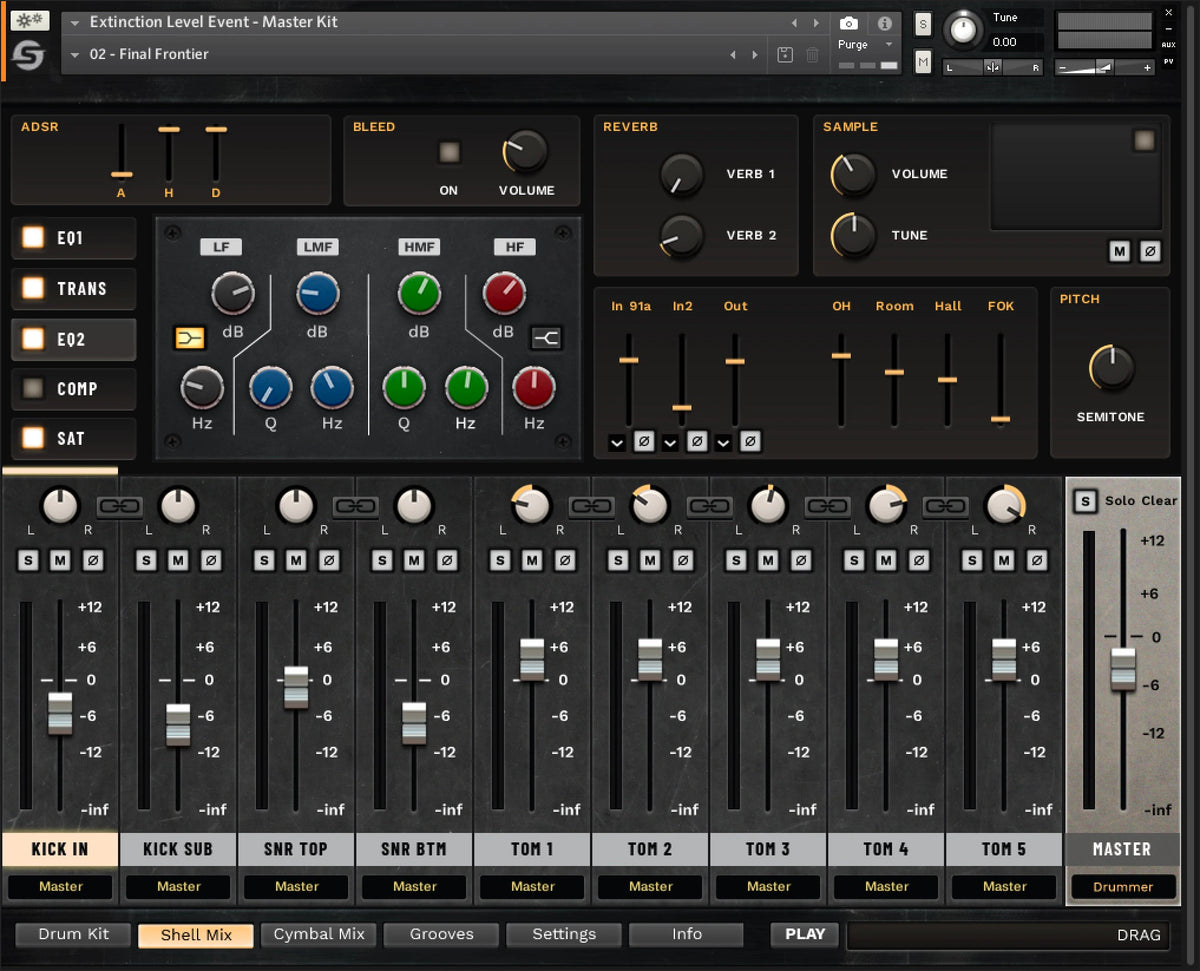
Every channel has its own strip, two EQ types, 1176-style compression, a transient designer, saturation, ADSR controls and two reverb sends (Plate or Non-Linear). The master section adds a Pultec-style EQ, SSL-style bus compression with a parallel mix knob, and tape saturation. Start from a mix-ready preset and stay in the moment instead of routing channels and loading plugins.
- Mix-ready presets for classic and modern rock
- Pultec-style EQ and SSL-style bus compressor on the master
- Re-route the audio outputs to your DAW however you like

Grooves played by real drummers.
Programming drums is slow and unfulfilling. ICON ships with a selection of MIDI grooves performed by real drummers, find the one that fits your song and you’re done. It works with electronic drum kits too, and remapping notes for your controller takes seconds. Want more? Any of our drum MIDI packs drop straight in.
- Integrated MIDI groove player with real-drummer grooves
- Fast, simple MIDI remapping for e-kits and controllers
- Load your own kick and snare one-shots straight into ICON
Key features
Full Bleed
Natural mic spill across every channel for an organic, live-drum feel.
Mix-ready presets
Presets for classic and modern rock that sit in a mix straight out of the box.
Complete built-in mixer
Per-channel EQ, compression, transient designer, saturation and reverb, plus a master bus section.
Human dynamics
Deep velocity layers and round robins keep ghost notes, rimshots and fast parts natural.
Your own one-shots
Load your own kick or snare samples straight into ICON, or pick from the processed one-shots included.
MIDI groove player
Real-drummer grooves built in; e-kit compatible with quick MIDI remapping.
Reviews

Icon Drums Classic Rock in action
The kit
Kicks
- Pearl Music City Custom Reference Pure 14×26
- Ludwig American Classic Maple 14×24
Snares
- Pearl Music City Custom Reference Pure 6.5×14 (high tuning)
- Ludwig Supraphonic LM402 6.5×14, 1970s (medium and low tuning)
- Ludwig Black Beauty 6.5×14 (medium and low tuning)
Toms
- Pearl Music City Custom Reference Pure 10×14, 16×16 and 16×18
Hi-hats
- 14″ TRX MDM
- 18″ Zildjian K “Frankenhats”
Ride
- 21″ Zildjian K Dark Organic
Crashes
- 18″ Sabian HHX Studio
- 18″ Zildjian K Sweet
- 18″ TRX BRT
- 19″ Zildjian K Dark
- 19″ TRX BRT
FX
- 10″ Zildjian A Custom splash
- 19″ Zildjian K china

System requirements
What people are saying
As an experienced sound engineer, I closed my eyes, and these drums do sound fucking good. Real good. Acoustic.
You “plug” all your plugins but don’t often mention ELE Drums, you should!
The ELE Drums have got to be the best sounding drum plugin available. I can’t wait for the update. I absolutely adore them and everyone should know about them.
One of the best drum plugins for sure
Sounds freaking amazing
I am using ELE since they released it for all the new songs of my band. This is by far the best sounding drums VST I have ever worked with.
Sounds great, Glenn knocked this outta the park...the bleed really makes it.
Glenn did an amazing job and since you said you were doing this review, I have been on pins and needles, Spectre Digital is the real deal, I love ELE, and I am in need, they sound better than any other drum program, Glenn solved this issue in grand fashion!
Thank you for all your hard work, it is amazing how ELE destroys the competition, I have a small set of Alesis Nitro and haven't used them as much as I would like, the sounds threw me off, I looked at other programs and nothing comes even remotely close to Extinction Level Event, I cannot imagine how long it must have taken to compile, admittedly, I take pride in knowing Glenn is Canadian and helping everyone be better and have access to all the tools needed. Cheers!
Damn, this rivals the fuck out if the GGD OKW metal
If you're still not using ELE, get it now! I dabble in metal for fun, but I write darkwave/goth stuff. The drums, especially the roomy preset, are phenomenal. They've replaced almost every drum groove I've written with exception to those that are meant to be electronic or sound like direct samples from a machine. Hell, just use them under your current grooves and samples at the very least and you will hear a very satisfying difference. If you want the kit tracked under separate channels, Glenn has a tutorial for Reaper. I've done it in FL Studio and made a preset for it. It's excellent! Checkout the VST and believe me when I say it has been such an enhancement to the overall flow of my mixes. Oh, Singularity is cool too. And so is Element. Try Element on your drums. It's gnarly!
I promised myself many years ago that I wouldn't spend any more money on music plugins and gear, because I had all I needed to make great sounding stuff.
I finally caved because of this spring sale you have, specifically for singularity and extinction level event.
And fuck me am I glad I did, this stuff sounds AMAZING. Especially given the guide you brought out on making sure to keep the velocities in the low-mid range. My old sample packs sounded best with the kick and snare at 127 (except for fills) and with the cymbals and toms around 80-100, but ELE sounds so alive and vibrant and allows for some real dynamics. I love it.
Things to know
License & activation
Your license key appears in your account right after purchase. Icon Drums Classic Rock is delivered through Native Instruments’ Native Access: install Native Access, sign in to (or create) your Native Instruments account, press Add Serial, paste your key, and install ICR from your library. It then shows up in your Kontakt tab, ready to load.
Installation
ICR runs on the free Kontakt Player 8, which Native Access downloads for you, you do not need the full version of Kontakt. Plan on about 12 GB of disk space for Kontakt Player and the library, and an internet connection for one-time activation. Once installed, load it in any DAW that hosts Kontakt Player (VST, VST3, AU or AAX) or run it standalone.
Refunds
Icon Drums Classic Rock is a digital product delivered through Native Access and is a final sale, a license can’t be returned once it has been issued. Not sure it’s right for you? Listen to the demos above, watch the walkthrough, or email support@spectredigital.com before you buy.
System requirements
Hardware: Apple M-series, Intel Core i5, AMD Ryzen or equivalent · 6 GB of RAM or more recommended · 12 GB of storage for Kontakt Player and Icon Classic Rock · a graphics card that supports OpenGL 2.1 or higher · an internet connection for one-time activation.
Software: macOS 12 and above (64-bit only): Standalone, VST, AU, AAX · Windows 10 and above (64-bit only): Standalone, VST, AAX · Kontakt Player 8 (provided with purchase) or Kontakt 8 · native Apple Silicon support.
Is there a demo version?
Unfortunately there is no way for us to offer a demo of Icon Drums Classic Rock, that’s a limitation of Native Instruments and Kontakt as a platform, at least currently. The audio demos on this page were made with the stock presets only, so they’re a fair picture of what you get.
Do I get free updates?
Yes. It doesn’t matter when you buy ICR, you always get free updates to the latest version, from the smallest bug fix to the biggest feature addition.
Do I need the full version of Kontakt?
No. Icon Classic Rock runs on Kontakt Player 8 without any loss of functionality. Native Access downloads Kontakt Player for free when you install ICR.
Will it work in my DAW?
Icon Classic Rock works in any DAW that supports Kontakt Player. If you can load a VST, VST3, AU or AAX plugin, you can use Kontakt Player, and therefore ICR.
What are the included TCI files?
Alongside the Kontakt library you get a full set of TCI files of the ICR shells for Steven Slate Trigger 2, an easy way to replace or augment existing drum tracks with ICR’s sound and accurate dynamics. Owning Trigger 2 is required to use them. The TCI download is delivered separately from the Native Access install.
Can you help me program better drums?
Spectre Academy offers courses that teach you everything you need to know about making the best possible programmed drums, including one dedicated to programming classic rock drums. If you’d rather write and tailor your own parts, that’s where to start: spectreacademy.net.
What's new
- Fixed: Pitch knob now works correctly on all drum shells.
- Improved: Massively reduced white noise sometimes present in sample playback.
- Improved: Round robin samples for snares and toms are more consistent.
- Improved: Snare rim samples sound more consistent.
- Improved: Floor Tom 2 pitch is consistent between all mic selections.
- Improved: Pitch knob is now linked for all kick channels on the mixer.
- Improved: Pitch knob is now linked for all snare channels on the mixer.
- Improved: MIDI Mapping selection now saves its state.
- Improved: Updated Toontrack MIDI mappings.
- Fixed: Channel Outputs are now persistent regardless of snapshot changes.
- Improved: HiHat pedal chick should respond better with e-kits.
- Improved: HiHat CC articulations response feels smoother now.
- Added MIDI grooves.